Check in to a meeting
Open the meeting page with its code or QR code, and you are on the attendance record.
Before you start
- Anyone at the meeting: members, and guests when the meeting is open to them
- Usually on a phone
Open the meeting page
Scan the QR code the organizer shows, or tap the link they shared.
No link? Go to npyou.app/checkin, type the code under Check-in code and tap Check in. Signed in, you can also tap Enter code on your dashboard, then Join a meeting.
Signed in? You are checked in on your own
While check-in is open, a signed-in member is checked in as the page loads. The line at the top changes to Checked in, and nothing else is needed.
Signed out? Say whether you are a member or a guest
The Check in card asks whether you are a member or a guest. Tap I’m a member of …, then I already have an account to sign in (or Create an account). You come back to the meeting already checked in.
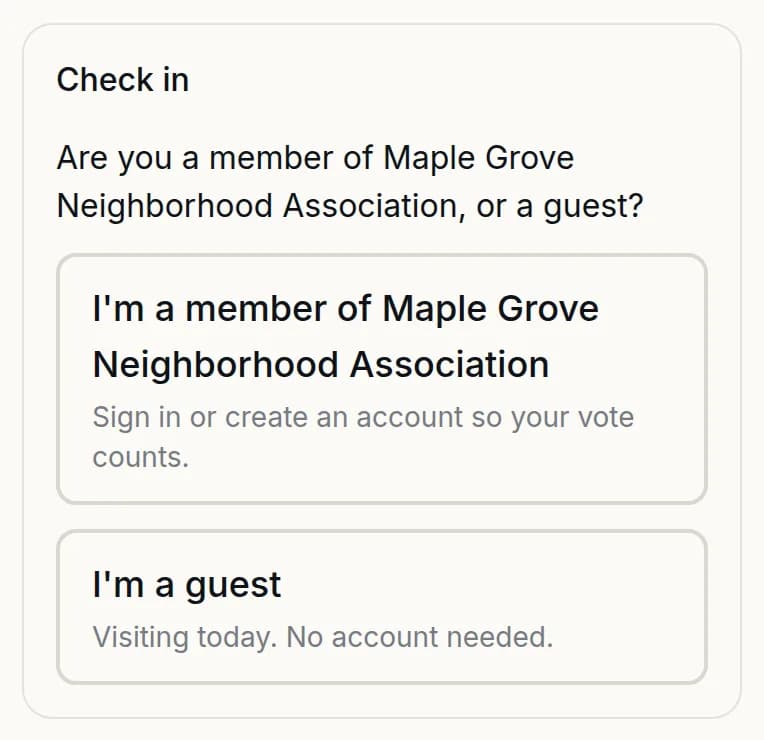
Guests: fill in the short form
Tap I’m a guest. Type your Name and Email, tick I agree to the Privacy Policy and tap Check in as guest.
Phone and organization are optional, under Add phone or organization. You see You’re checked in! when it has worked.
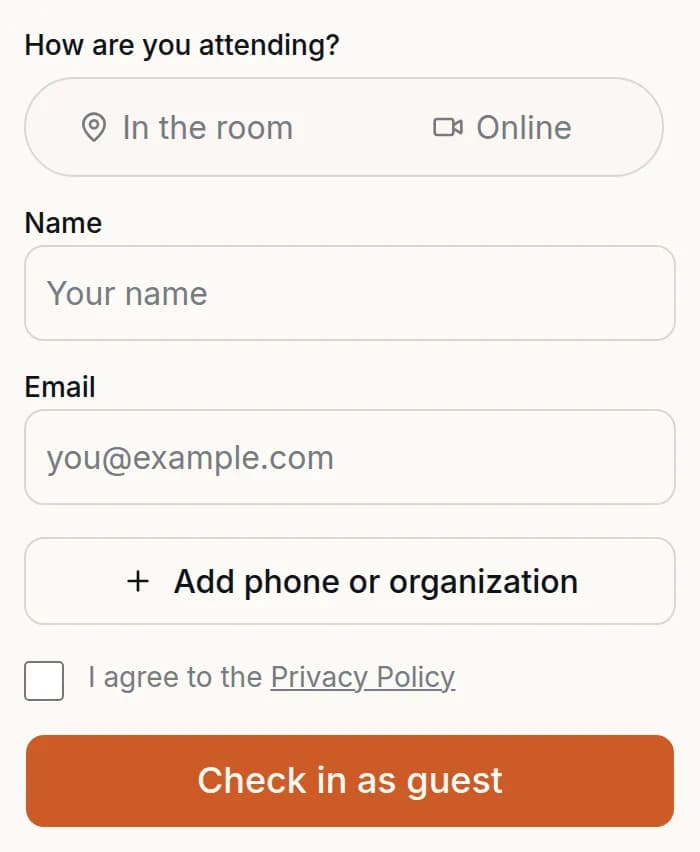
Hybrid meetings: say how you are attending
When a meeting is both in the room and online, choose In the room or Online under How are you attending?. Guests answer on the form; members answer on the meeting page after check-in. One tap changes it, until the meeting ends.
Read the status line
The line above the tabs says where you stand:
- Checked in. You can vote: a ballot appears in the Vote tab as each item opens.
- Checked in. Waiting to be marked present: the organizers still need to add you to the attendance list.
- Checked in. Not eligible to vote today: the organization’s attendance rule applies. An organizer can grant an exception for this meeting.
- Checked in as a guest. Voting is for members: you are on the record, with no ballot.
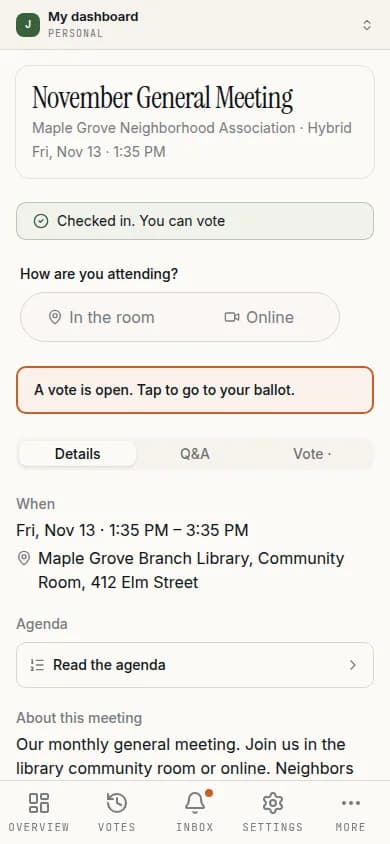
Look at the details
Once checked in, the Details tab shows what the organizers shared: when and where, the agenda and the papers. Q&A and Vote sit beside it.
If something isn't working
- The page says Check-in isn’t open
- The organizer hasn’t tapped Start meeting yet, or paused check-in. The page updates on its own. If the meeting is under way and you are a member, ask a facilitator to mark you present.
- The page says Check-in has closed
- Check-in closes when the organizer ends the meeting, and in any case 12 hours after the scheduled end. If you attended, the organizer can still mark you present.
- I’m a member, but I see the guest form
- You are signed out, or signed in with a different account. Tap I’m a member of … and sign in. A guest check-in puts you on the record but gives you no ballot, so members should always sign in.
- It says This meeting is for members
- This meeting takes no guests. Sign in if you are a member. If you aren’t one yet, tap Request membership and an admin can approve you during the meeting. See Join an organization.
- It says my account needs a verified email address
- Tap Verify my email, check the address and tap Send code, then type the code we email you and tap Verify. Your sign-in email stays the same, and the check-in form appears. Or sign out to check in as a guest.
- It says Checking you in… and nothing happens
- Tap Try again. If it still fails, ask a facilitator to mark you present; they can do that from their screen in a moment.
Related
Still stuck?
Reach the team directly. We usually reply within a day.