Vote during a meeting
Your ballot appears on the meeting page as each item opens. Tap your answer; you have 5 seconds to undo it.
Before you start
- Members checked in to the meeting
- Usually on a phone
Check in first
Only members checked in to the meeting can vote. Open the meeting page signed in, and the status line should read Checked in. You can vote. See Check in to a meeting.
Wait for the ballot
When the facilitator opens voting, the page switches to the Vote tab on its own and a banner says A vote is open. Tap to go to your ballot. Until the first item starts it reads Voting hasn’t started yet. Keep the page open; it updates every few seconds.
Tap Yes, No or Abstain
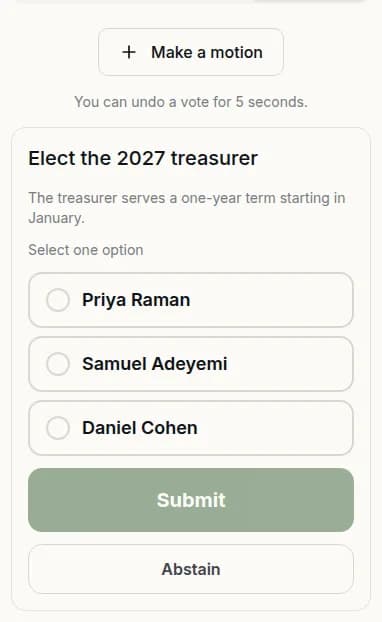
For a yes-or-no item, tap Yes, No or Abstain. Your answer shows with an Undo button counting down from 5: tap it to take the vote back. When the countdown ends the vote is in, and the page shows Vote recorded. No one in your organization, admins included, is shown how you voted.
Multiple choice: pick, then Submit
The item says Select one option or Select up to …. Tap your choices, then Submit. To sit this one out, tap Abstain.
A vote can’t be changed
Once the countdown ends, a vote stays: the item reads Your vote for this item was already recorded. Then the page says Waiting for the next voting item... until the facilitator starts the next one.
If the facilitator asks for a re-vote
The item comes back with This item was reopened for a re-vote. Cast your vote again. Your earlier vote stays in the record as a separate round.
Make a motion, when the meeting allows it
Tap Make a motion on the Vote tab, give it a Title and an optional description (the buttons above the box format it), and tap Submit. The facilitator accepts it (it joins the ballot) or rejects it, and you get a notification either way.
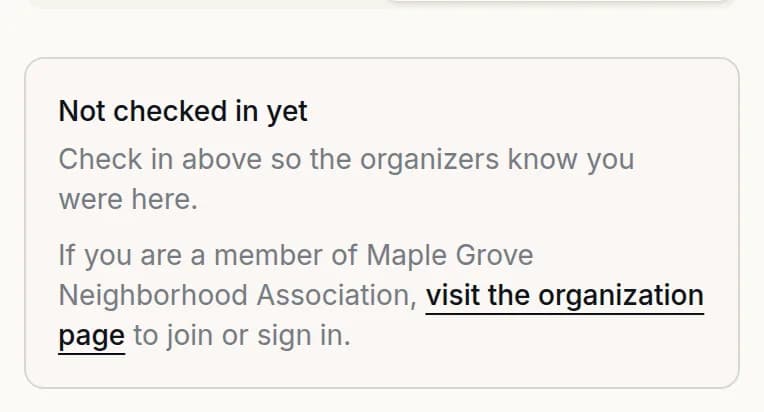
No ballot? Read the card
- Not checked in yet: check in above, or ask a facilitator to mark you present.
- Not eligible to vote: the organization asks for recent attendance before voting. An organizer can grant an exception for this meeting.
- Checked in. Voting is off for you: an admin turned voting off for your membership.
- Checked in as a guest: guests are on the record but never vote.
If something isn't working
- I tapped the wrong button
- Tap Undo under your answer within 5 seconds. After that the vote is recorded and can’t be changed; tell the facilitator, who can run Vote again on the item, which starts a fresh round for everyone.
- The page didn’t jump to the ballot
- Tap the Vote tab yourself. If it still shows nothing, check your connection and reload the page; your check-in is kept.
- It asks me to sign in
- Meeting votes are for signed-in members. Sign in with the account your organization knows; you come straight back to the meeting.
- Make a motion isn’t there
- The meeting’s vote doesn’t allow motions, or you aren’t checked in as a member. Guests can’t make motions.
Related
Still stuck?
Reach the team directly. We usually reply within a day.