Manage members
Find a member, change their role, pause or restore their membership, and set whether they can vote.
Before you start
- Admins. A few actions are for the owner only.
- Easiest on a computer
Open the Members page
The tabs are All, Pending, Active, Inactive and Denied. Use Search by name or email… and the Role, Tag and Sort filters. The Eligible column shows who can vote under your rules.
Open Member Details
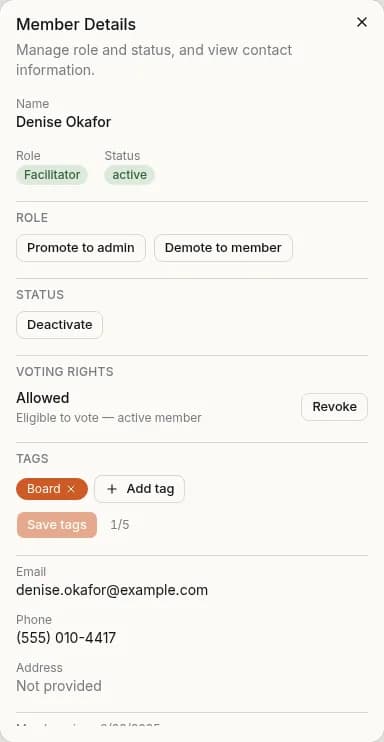
Tap a row. Everything below happens in the Member Details dialog.
Change a role
Tap Promote to facilitator, Promote to admin, Demote to facilitator or Demote to member, then Change role in Change member role?.
Facilitators run meetings and polls but never see Members, Contacts, Billing or Settings; the role is on Starter and up. Admin seats are limited by plan (Admin limit reached for your plan.).
Deactivate or reactivate
Deactivate ends someone’s access and frees their seat; their history stays. They can’t rejoin with the invite link: only Reactivate here brings them back, with their old role. Demote an admin before deactivating them.
Turn voting on or off for one member
Under Voting rights (Allowed or Revoked), tap Revoke or Restore. It covers every vote in your organization; the member’s meeting page reads Checked in. Voting is off for you.
Add tags
Under Tags, tap Add tag and Save tags, up to 5 per member. The tag list lives in Settings, Members, Member Tags (up to 12, with Allow custom tags). Tags are on Community and up.
Contact details
Phone and Address show only for active and pending members, and never to facilitators. Email is always shown to admins.
Owner-only actions
Only the owner can demote or deactivate another admin, and hand the organization over: promote the person to Admin, open them again, tap Make owner and confirm with Transfer ownership. You stay an admin.
On the Free plan, which has one admin seat, the dialog offers Step down and promote instead: you swap places, once every 30 days.
If something isn't working
- Promote to facilitator isn’t offered
- The facilitator role is on Starter and up. The dialog says so under the role buttons.
- Promote to admin says the admin limit is reached
- Your plan has a fixed number of admin seats. Demote an admin who no longer needs it, or change the plan.
- I can’t deactivate an admin
- Demote them first. Only the owner may demote another admin, and the owner can’t be demoted at all: transfer ownership first.
- A member reads Eligible, but had no ballot at the meeting
- They must be on the meeting’s attendance list, and if your organization has an attendance rule, meet it or hold an override for that meeting. See Set quorum and who can vote.
Related
Still stuck?
Reach the team directly. We usually reply within a day.