Set quorum and who can vote
Quorum is a record, never a block. Eligibility rules and voting rights decide whose ballot appears.
Before you start
- Admins
- Easiest on a computer
Open Settings, then Voting
In the admin area, open Settings and the Voting tab. It holds the Quorum, Voting Eligibility and Motions cards.
Set quorum
Under Quorum mode, choose Off (no quorum requirement), Fixed number of members or Percentage of active members (on Community and up). Advanced sets the Active members denominator: All active members or Active members excluding admins. Tap Save.
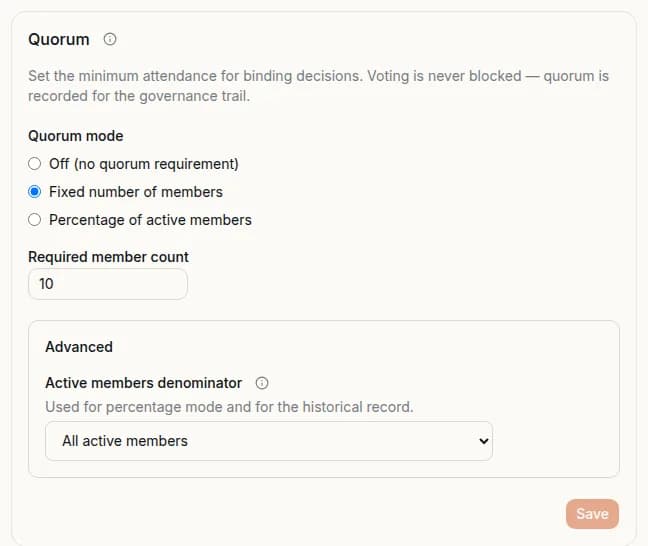
Know what quorum does
- It never blocks anyone from voting.
- The live panel shows Quorum met or Quorum …; tap the pill for details.
- It is recorded when voting closes or the meeting ends, and shown on results and exports.
- Only members on the attendance list count. Guests never do.
Set the attendance rule
Under Voting Eligibility (on Starter and up), switch on Require recent attendance to vote and set the Attendance window (days) and Minimum meetings. Grace period for new members lets newcomers vote for Grace period (days). Tap Save. The rule covers meeting votes and member polls; public polls are never affected.
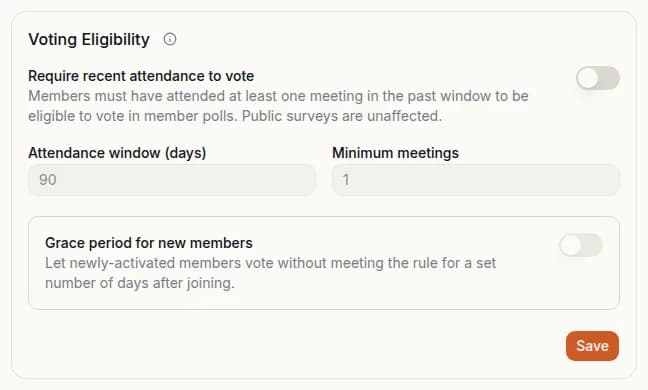
Grant an exception at a meeting
On the live panel’s Attendance card, a Can’t vote icon marks a member the rule excludes. Tap it and choose Allow to vote in this meeting; Remove override undoes it. Overrides appear in the detailed report as that person’s eligibility.
Turn voting off for one member
On the Members page, open the person and use Voting rights: Revoke or Restore. This works on every plan and covers every vote.
If something isn't working
- Percentage of active members is greyed out
- Percentage quorum and the denominator choice are on Community and up. A fixed number works on every plan.
- Quorum reads short with a full room
- Guests don’t count, and members count only once they are on the attendance list. A percentage is measured against all active members, or all but admins if you chose that, and then admins present don’t count either.
- A new member can’t vote
- The attendance rule applies. Turn on the grace period for new members, or grant them an override for the meeting.
- The live panel suggests setting up quorum
- That tip appears for admins while no quorum is set. Set it here, or ignore it.
Related
Still stuck?
Reach the team directly. We usually reply within a day.