See results and export them
Every meeting has a results page with attendance, tallies and the Q&A transcript, and an Export button for a PDF or CSV.
Before you start
- Admins and facilitators, on every plan. Exporting is on Starter and up, and the detailed report is for admins.
- Easiest on a computer
Open Meeting Results
From the meeting page, tap View results. The page shows a run summary (Show history), Attendance with Members / Guests and In the room / Online filters, the Q&A Transcript, and Vote Results. Late marks are flagged.
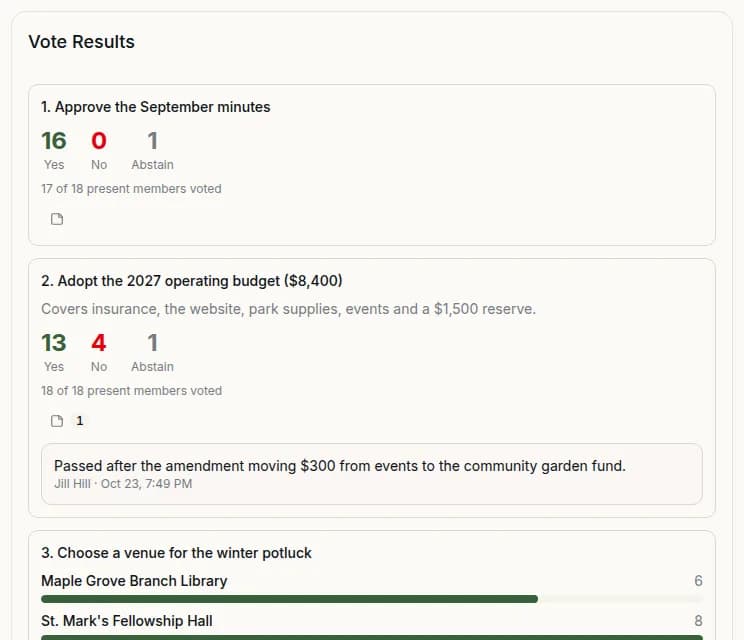
Read the vote results
Each item shows its tally, per round. Once the vote has closed, Who voted lists the names (a count only for a public poll). Nobody, admins included, is ever shown how a person voted.
Tap Export
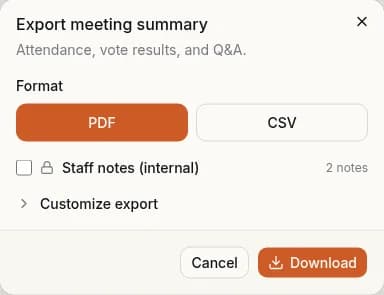
Export opens Export meeting summary. Choose PDF or CSV. Exports work any time, on Starter and up.
Pick the sections
Customize export lets you tick Attendance, Vote results and Q&A.
Detailed report, for admins
Detailed report sits under Attendance and adds who voted and why each person was allowed to (the grace period or an override), never how. It needs an admin, Pro, a closed vote and the Attendance section ticked.
Staff notes
Staff notes (internal) adds the notes staff wrote during the meeting. It is unticked every time, and the file name ends in “-internal”, so keep that file inside the team.
Tap Download
The file downloads straight away.
Polls outside a meeting
On a poll’s page, Export appears once the poll is closed and opens Export results, with the same PDF and CSV choice and the detailed report on Pro.
If something isn't working
- There is no Export button
- Exports are on Starter and up. On a poll, the button appears only after the poll closes.
- Detailed report is greyed out
- It needs all four: an admin, Pro, a closed vote and the Attendance section ticked. The dialog says which one is missing.
- Who voted isn’t shown
- It appears only after the vote closes, never while it is open.
- Can I see how someone voted?
- No, on any plan. Members see their own votes under Votes on their dashboard.
Related
Still stuck?
Reach the team directly. We usually reply within a day.