Run a poll outside a meeting
A standalone poll for members or the public, with a code people enter at npyou.app/vote.
Before you start
- Admins and facilitators
- Easiest on a computer
Create the poll
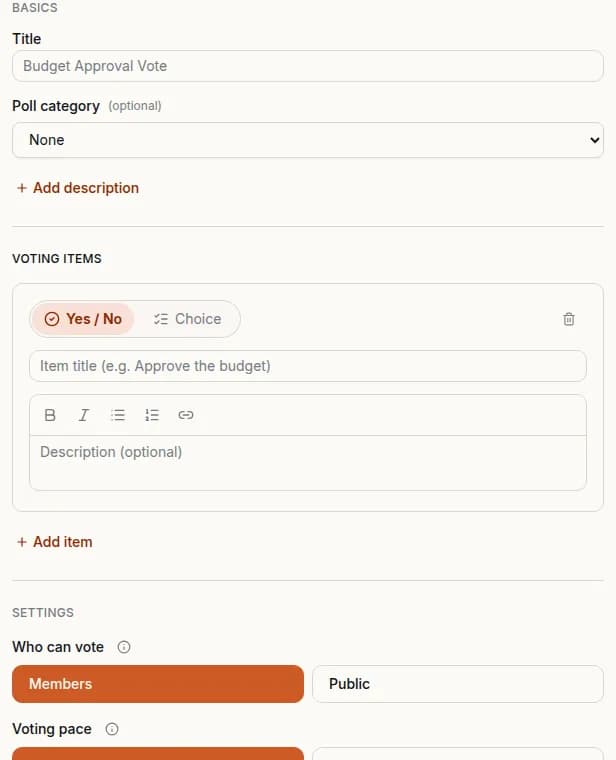
Open Polls and tap New poll. Give it a Title (and Add description if useful), then write the Voting Items, each Yes / No or Choice, with Add item. The icons above the poll’s description and each item’s format the text: B for bold, I for italic, the two list icons for a bulleted or numbered list, and the chain for a link. Voters see the first five lines with Show more.
Choose who can vote and the pace
Who can vote: Members (active members, under your eligibility rule and voting rights) or Public (anyone signed in).
Voting pace: All at once lets people vote on every item at their own pace: they mark each one, review, and submit one ballot, and nothing counts until they submit. One at a time means you open each item in turn, and each tap is a vote. Add deadline closes the poll on its own at a date and time, in your organization’s time zone. Tap Create poll; it counts toward your plan’s monthly vote limit, and on a plan with a limit the form says how many are left this month.
Open the poll
On the poll’s page, tap Open poll and confirm. Members get a Poll opened notification (and an email if they opted in), and their dashboard shows Vote now.
Share the code
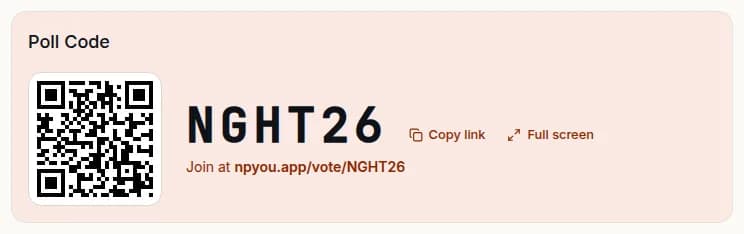
The Poll Code card shows the code and a QR code, with Full screen for a projector (press Esc or tap anywhere to leave it) and Copy link to copy the join link. Voters go to npyou.app/vote, enter the Poll code, tap Join poll and sign in.
One at a time: run the items
In the Voting card, tap Start vote on an item to open it and Close vote when done; votes reach the tally 5 seconds after each tap, so wait a moment before closing. On either pace you can Add another item while the poll is open, and members’ motions wait under Motions waiting when your organization allows them. Each open item shows its tally and how many have voted so far, out of the eligible members (a plain count on a Public poll), so you can tell when to send a reminder.
Close the poll
Tap Close voting at the bottom of the Voting card and confirm, or let the deadline do it. Ballots not submitted by then aren’t counted. The page then shows the Results, when and how it closed, and who voted (a count for a public poll), with Export at the top on Starter and up. In the Polls list, a closed poll’s button reads View results.
What you can edit
A draft can change everything. An open poll can change only its title, description and category. Polls have no Vote again; that is a meeting feature. A draft that was never opened can go: Delete draft is at the bottom of Edit, and deleting one created this month gives back its vote.
If something isn't working
- A voter sees You can’t vote here yet
- A Members poll is for active members. Someone with no membership can tap Request to join, and you approve them on the Members page; a member whose request is waiting, whose membership is inactive or whose voting is off is told what to ask an admin instead. Revoked voting rights or the attendance rule also block a ballot.
- Someone typed the code at npyou.app/vote and landed on a meeting page
- Meeting codes redirect there on purpose. A meeting’s vote happens on the meeting page.
- It says Voting has closed
- The poll was closed, or its deadline passed. People who voted see Thank you for voting and See your vote. Create a new poll if the vote must run again.
- Open poll says the deadline has passed
- Tap Edit, pick a later deadline or remove it, then open the poll. A poll can’t open after its own deadline.
- I can’t add a deadline on a meeting’s vote
- Deadlines belong to standalone polls. A meeting’s vote ends with the meeting.
Related
Still stuck?
Reach the team directly. We usually reply within a day.