Run Q&A
Turn Q&A on, choose who can ask and whether you review first, then approve, highlight and answer from the live panel.
Before you start
- Admins and facilitators
- On a phone, tablet or computer
Set it up before the meeting
On the meeting page before you start, the Q&A card offers Open Q&A when the meeting starts. A new meeting copies your organization’s defaults from Settings; change them here for this meeting with the Q&A settings gear.
Turn it on during the meeting
In session, the Q&A card on the live panel has an Active switch. Off, people see the questions but can’t ask. It works only while the meeting is in session.
Choose the settings
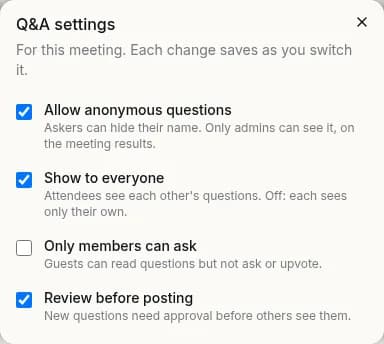
- Allow anonymous questions: askers may hide their name from the room.
- Show to everyone: the room sees the questions and can upvote them. Off, only staff see them.
- Only members can ask: guests can read but not ask or upvote. Hidden in a members-only meeting.
- Review before posting: new questions wait for your approval.
Approve waiting questions
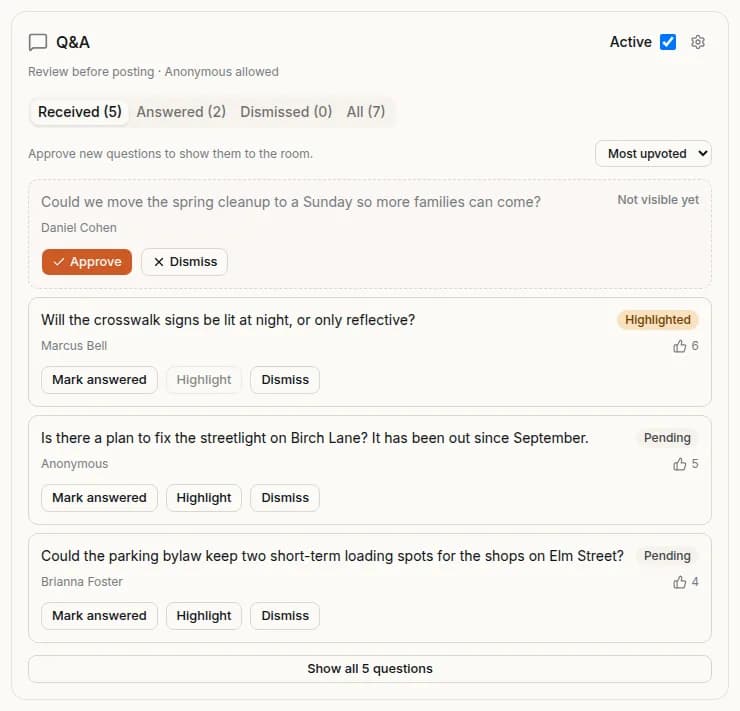
With review on, new questions sit at the top of Received marked Not visible yet. Tap Approve to show one to the room, or Dismiss.
Work the queue
The tabs are Received, Answered, Dismissed and All. On each question, tap Mark answered, Highlight (pins it to the top for the room) or Dismiss. Once questions have upvotes you can sort Most upvoted or Oldest first.
Know who sees anonymous askers
The live list shows no name for an anonymous question, to staff included. Only an admin can see who asked, on the results page after the meeting. Exports print “Anonymous”.
After the meeting
Q&A stops at End meeting. The results page keeps the full Q&A Transcript, with never-reviewed questions marked Not reviewed, and exports can include it.
If something isn't working
- Active won’t switch on
- Q&A runs only while the meeting is in session. Start the meeting first, or reopen it after an End.
- People say they can’t upvote
- Upvotes need Show to everyone. Nobody can upvote their own question, and guests can’t when Only members can ask is on.
- A guest sees no Q&A
- In a members-only meeting, guests get no Q&A at all, not even to read.
- I switched anonymous questions off, but the names didn’t appear
- That is by design: a question asked anonymously stays anonymous whatever you switch later.
Related
Still stuck?
Reach the team directly. We usually reply within a day.